













 Duc Nguyen (Dwight)
Learn what the memory layer in enterprise AI is, how it works, and why it matters for cost control, productivity, and scalable AI adoption.
Table of Contents
Toggle In enterprise AI, the memory layer is the system that helps AI remember useful context over time. Think of it like a shared company brain that stores what matters: approved knowledge, customer history, past decisions, process steps, business rules, project context, and feedback from earlier work.
Without this layer, an AI system behaves like a new employee who starts every meeting with no memory of previous work. It may answer one question well, but it cannot build continuity. It cannot remember what the finance team approved last week, which product issue was already solved, or which customer rule should apply to a repeat request.
For a company, that is expensive. People repeat explanations. Teams re-check documents. AI agents ask for the same context again and again. The result is not transformation. It is automation with amnesia.
A memory layer changes that. It gives enterprise AI a controlled way to remember, retrieve, and reuse context so the system can support real work, not just one-off answers.
The strongest argument against investing in a complex memory architecture usually centers on the rapid advancement of foundational models. Today, Large Language Models (LLMs) boast context windows of one to two million tokens. The natural assumption is that a dedicated memory layer is unnecessary overhead. If a model can process an entire company handbook, a year of financial reports, and thousands of customer support tickets in a single prompt, why build external infrastructure to remember it?
This reliance on the context window fails under the rigorous demands of enterprise economics and governance.
A memory layer succeeds where the context window fails because it permanently organizes information outside the model. It retrieves and feeds the AI only the exact, permissioned fragments of data required for the specific user at that exact moment, drastically reducing compute costs and preserving strict data governance.
A memory layer is often confused with a database or knowledge base. They overlap, but they are not the same.
In simple terms:
| Layer | What it stores | Business role |
|---|---|---|
|
Database |
Structured records |
Source of transaction data |
|
Knowledge base |
Documents and policies |
Source of reference knowledge |
|
Memory layer |
Useful context over time |
Source of continuity for AI work |
This difference matters because enterprise AI is not only about finding information. It is about applying the right information in the right business situation.
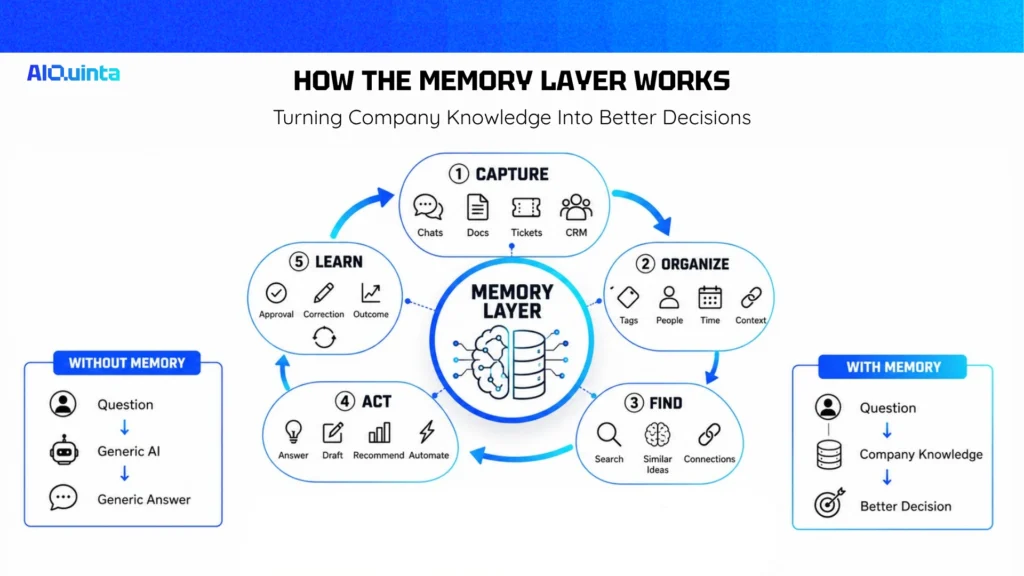
The system collects useful information from chats, documents, tickets, CRM systems, ERP systems, workflow tools, meeting notes, and user feedback.
Not everything should become memory. A good memory layer filters noise. It should capture facts that can improve future work, such as approved decisions, recurring customer preferences, process rules, ownership, and task outcomes.
Raw information is messy. The memory layer must organize it so AI can use it.
This may include tags, summaries, business entities, timestamps, confidence scores, source links, and access rules. For example, a memory item might say:
“Customer A uses custom payment terms approved by Finance on May 12. Valid until contract renewal.”
That is more useful than storing a full email thread with no structure.
When a user asks a question or an agent starts a task, the system searches for relevant memory.
This is where vector search and knowledge graphs often work together. Vector search helps find similar meaning across messy text. A knowledge graph helps show relationships, such as which team owns a process, which customer belongs to which account group, or which policy applies to which region.
For non-technical readers, think of vector search as “finding similar ideas” and a knowledge graph as “finding how things are connected.”
The AI model receives the relevant context and uses it to answer, recommend, draft, route, or act.
This is where business value appears. The system is no longer giving a generic answer. It is using company-specific context.
The memory layer should learn from corrections, approvals, and outcomes.
If a manager rejects an AI recommendation, that feedback should improve future recommendations. If a support answer solves a ticket, the system should know that the answer was useful. If a policy changes, old memory should be updated or retired.
Without feedback, memory becomes stale. Stale memory is not an asset. It is a liability.
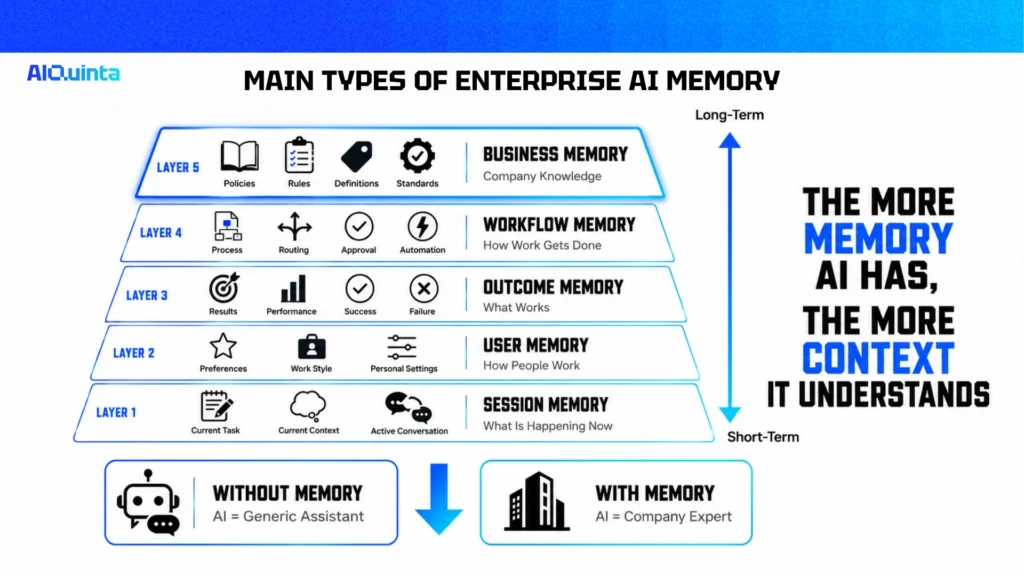
This is short-term memory inside one conversation or task. It helps the AI remember what the user just said.
Example: a user asks the AI to compare three vendors, then says, “remove the second one.” Session memory helps the AI understand what “second one” means.
This stores useful user-level preferences and work patterns.
Example: a marketing manager prefers short LinkedIn captions, while a finance manager prefers table-based summaries.
User memory should be controlled and transparent. Employees should know what is stored and be able to correct it.
This is the most important layer for enterprise AI. It stores approved company knowledge, such as definitions, policies, product details, workflows, and decision rules.
Example: “Net revenue excludes refunds, discounts, and tax.” If AI does not know this, reports can become inconsistent.
This stores how work gets done.
Example: when a purchase order is missing supplier tax information, the system should route it to procurement before finance approval.
Workflow memory turns AI from a passive assistant into a process-aware system.
This stores what happened after an AI-supported action.
Example: a recommended maintenance action reduced downtime, or a sales email led to a meeting. Outcome memory helps leaders measure what works.
The memory layer should be evaluated like any operational investment.
A simple ROI model can start with five questions:
This moves the discussion from “AI is impressive” to “AI reduces cost and improves throughput.”
For example, if a support team handles 20,000 tickets per month and a memory layer saves two minutes per ticket, that equals 40,000 minutes saved monthly. That is about 667 hours. The real value is not only labor time. It also includes faster customer response, fewer escalations, and better knowledge reuse.
That is the economic case.
The memory layer in enterprise AI is not just a technical feature. It is a business infrastructure layer that helps AI remember, retrieve, and reuse the context needed for real work.
The counterpoint still stands: companies should not add memory before they fix weak data, unclear processes, and poor ownership. But once AI moves from simple Q&A to workflow execution, memory becomes critical.
A strong memory layer helps reduce repeated work, improve answer quality, lower AI processing waste, preserve institutional knowledge, and scale AI agents with more control.
The best enterprise AI systems will not be the ones with the largest models. They will be the ones with the best context, the cleanest memory, and the clearest link to economic outcomes.
What is the memory layer in enterprise AI?
AI Memory is the ability of an AI system to store, retrieve, and use past context across sessions, users, workflows, and decisions. It helps AI agents move beyond one-off responses and support continuous work.
Is a memory layer the same as a knowledge base?
No. A knowledge base stores documents and information. A memory layer helps AI decide which information matters for a specific task, user, workflow, or business situation.
How should a company start building an AI memory layer?
Start with one workflow where missing context causes clear cost. Define what the AI must remember, connect trusted sources, add access control, measure impact, then expand after ROI is proven.