











 Duc Nguyen (Dwight)
Learn what a context window is, why it matters in AI, and how businesses can use it to cut costs, improve answers and scale AI use cases.
Table of Contents
Toggle A context window is the amount of information an AI model can use while creating an answer.
Think of it like a meeting table. Everything placed on the table can be used in the discussion. Anything left outside the room cannot be used unless someone brings it back in.
For AI, the “table” includes:
This matters because AI does not remember everything by default. It can only work with the information placed inside its current context window.
A simple example:
You ask an AI assistant to review a 5-page customer complaint. If the full complaint fits inside the context window, the model can read the whole case and respond with a full summary. If the document is too long, the system must shorten it, split it, or select only the most useful parts.
In business terms, the context window decides how much information an AI tool can handle in one task before it needs help from search, memory, or data preparation.
Many teams overrate context window size. A bigger window does not guarantee better answers—it only allows more information at once. The real value comes from using the right information.
A context window impacts five key areas:
Many people confuse context window, AI memory, and retrieval-augmented generation, often called RAG. They are related, but they are not the same.
| Concept | Simple meaning | Business role |
|---|---|---|
|
Context window |
What AI can use right now |
Handles the current task |
|
AI memory |
What the system can store over time |
Keeps useful knowledge across tasks |
|
RAG |
Search that brings relevant data into the prompt |
Finds the right documents or facts |
|
Knowledge base |
Organized company information |
Supplies trusted content |
|
Data platform |
Source systems and records |
Provides operational truth |
The context window is temporary. Once the task ends, the model may not keep that information unless the system stores it elsewhere.
AI memory is different. It helps retain useful facts, preferences, task history, or business knowledge across sessions.
RAG is also different. It searches company data and pulls relevant parts into the context window.
For business AI, the winning setup is not only a large context window. It is a smart system that finds, filters, ranks, and sends the right context to the model.
Every AI workflow has a unit cost. A simple chatbot answer may be cheap. A full contract review with many attached files may cost more.
Context window size affects that cost because long inputs use more tokens.
A business should ask:
The goal is not to minimize context. The goal is to pay for useful context.
A larger context window can save time when employees work with long information.
For example, a procurement team may ask AI to compare supplier quotes, delivery terms, and payment conditions. If the AI can see the full set of documents, it can reduce hours of manual checking.
But the return depends on process design. If employees still need to clean, merge, and validate files by hand, the value is limited.
Context windows help AI connect details across documents.
For example, in manufacturing, an AI assistant can review machine logs, maintenance notes, spare part records, and operator comments. It can then suggest likely root causes for downtime.
The economic gain is not “AI gives an answer.” The gain is faster diagnosis, less downtime, and better use of expert time.
Poor context creates poor answers. Poor answers create rework.
If an AI sales assistant does not know the latest product pricing, it may draft a wrong proposal. If an AI support tool misses the customer’s past issue, the agent may repeat the same steps.
Good context reduces repeat work.
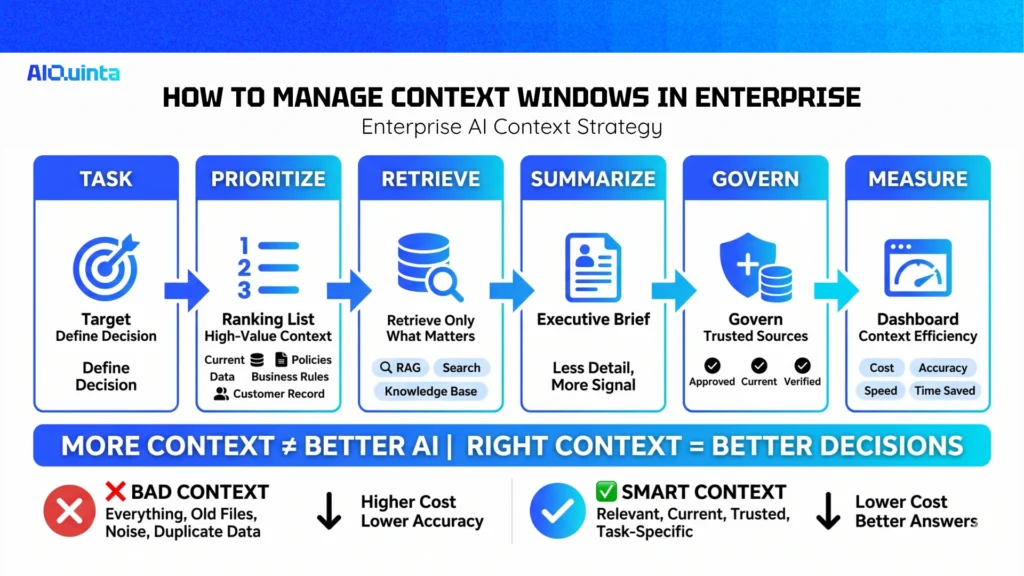
The best practice is not to send everything to the model. The best practice is to build a context strategy.
1. Define the task first
A contract summary needs different context than a customer support reply. A maintenance root cause analysis needs different context than a marketing brief.
Start with the business decision. Then decide what context is needed.
2. Rank context by value
Not all data has equal value.
High-value context may include:
Low-value context may include old drafts, repeated text, outdated files, or unrelated chat history.
3. Use retrieval for long knowledge bases
If the company has thousands of documents, do not put all of them into the prompt. Use search or RAG to bring in only the relevant parts.
This keeps cost lower and improves focus.
4. Summarize when detail is not needed
Some tasks need exact detail. Others only need a short summary.
For example, an executive brief may not need the full meeting transcript. It may need decisions, owners, dates, risks, and next steps.
5. Keep trusted data sources clean
Context quality depends on data quality. If the knowledge base is outdated, the AI will produce weak answers.
Enterprises should assign ownership for key knowledge sources, review content, and remove stale material.
6. Measure context efficiency
Track how much context is used per task and whether it improves outcomes.
Useful metrics include:
This turns context management into an operating metric, not a technical detail.
A context window is the short-term working space of an AI model. It decides how much information the model can use while answering a question or completing a task.
For business leaders, the key point is not the size alone. The key point is context economics.
A larger context window can unlock better document analysis, smoother workflows, and stronger decision support. But it can also raise cost, slow systems, and reduce focus if used without discipline.
The practical move is to manage context as an enterprise asset. Clean the data. Retrieve only what matters. Summarize when needed. Keep business rules visible. Measure cost and quality by workflow.
In enterprise AI, better context often beats bigger context.
What is a context window in simple terms?
A context window is the amount of information an AI model can look at while creating an answer. Think of it as the AI’s short-term memory for the current task.
Is a larger context window always better?
No. A larger context window lets AI process more information, but it can also increase cost, slow response time, and make the model less focused if the input contains too much noise.
What is the difference between context window and AI memory?
A context window is temporary. It helps the model with the current task. AI memory stores useful information over time so the system can use it again later.